Skip to contentSkip to content
Spitfire Client Services

Spitfire Client Services

  • Support
    • KBA
    • Downloads
      • Implementation – Getting Started
      • Implementation – Templates
    • Training
  • Documentation
    • Focus Guides/TWP
    • What’s New in Spitfire
    • System Requirements
  • Newsletter Articles
  • Webinars
  • Video Library

KBA-01855: Bad Issuer Message When Logging In

Spitfire Client Services >> Knowledge Base>> KBA-01855: Bad Issuer Message When Logging In
June 17, 2024June 17, 2024| Soni YorkSoni York|
Categories:
  • Knowledge Base

Question:

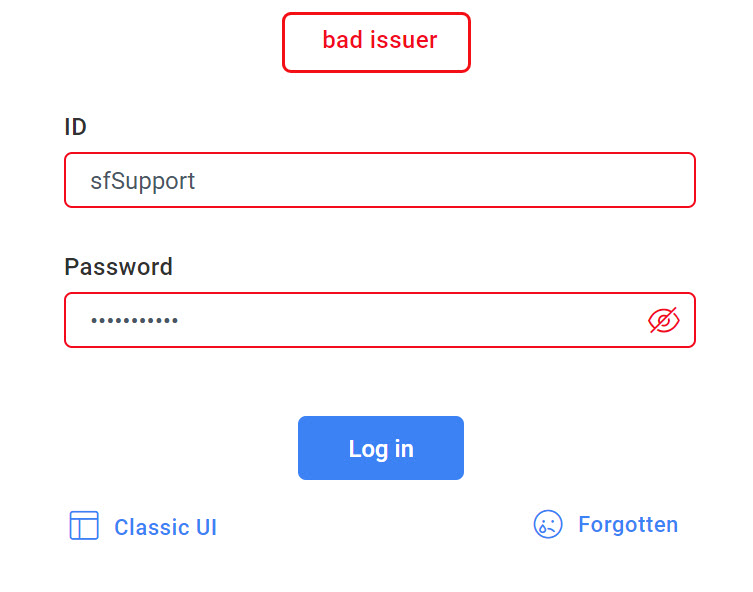
I am trying to log into Spitfire. When I enter my ID and password and click the Log in button in Power UX, I get a “bad issuer” message. What should I do?
Answer:

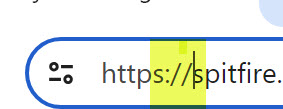
V23, which default to the login screen in Power UX, requires secure URLs. The “bad issuer” message indicates that the URL is not secure. If you open Spitfire from a shortcut, that shortcut might have an older unsecure URL. You can know that the URL is not secure by the words in front of the URL:

Short Term:

Position your cursor at the beginning of the URL and type or ensure that it starts with https://
Long Term:

Change the URL on your shortcut so that it starts with https:// or talk to your IT expert.


KBA-01855; Last updated: June 24, 2024 at 10:25 am

Tags: login

Post navigation

PREVIOUS Previous post: KBA-01854: Pointing to RawItems in Bi-Directional Templates
NEXT Next post: Setting the Default Doc Status

Related Post

KBA-01005: Why do I get a Licensing Error: License file has incorrect signature?KBA-01005: Why do I get a Licensing Error: License file has incorrect signature?

Question: Why do I get a Licensing Error: License file has incorrect signature? Answer: The error Licensing Error: License file has incorrect signatureis caused when the sfPMS.lic license file has

Read MoreRead More

KBA-01542: jQuery is UndefinedKBA-01542: jQuery is Undefined

Question: Why do some client workstations get a ‘jQuery is undefined‘ error? Answer: jQuery is a fast, small, and versatile library published by the jQuery.org (the jQuery Foundation).The various parts

Read MoreRead More

KBA-01619: Display Folder Name in a column for Catalog Search ResultsKBA-01619: Display Folder Name in a column for Catalog Search Results

Question: How do I display the file folder name in a column in catalog search results? Answer: By default, folder names are indicated using a mouse-over tool tip.  If you

Read MoreRead More
  • KBA-01908: Disabling Automatic Budget Revisions from Change Orders
  • KBA-01907: Changing the Default “Include” for Attached Files
  • KBA-01906: How to Set Up an Alert for Changed Doc Status
  • KBA-01905: Dealing with Pay Request Mistakes
  • KBA-01904: Downloading an Attachment File in Power UX
  • Client Webinars
  • Documentation
  • Knowledge Base
  • Newsletter Articles
  • Rules
  • Spitfire Reports
  • Training
  • Uncategorized
  • Videos (Power UX)
  • Videos (Quick, Basic Q&A)
  • What's New
  • Workflow Scripting

Meta

  • Log in

Spitfire Management, LLC
5219 Monticello Avenue #5444
Williamsburg, VA 23188

VW Machine Learning WordPress Theme Copyright 2025 Spitfire Management, LLC. All rights reserved.

Scroll Up