This report lists your configuration, code and rule changes between version snapshots taken on two dates.
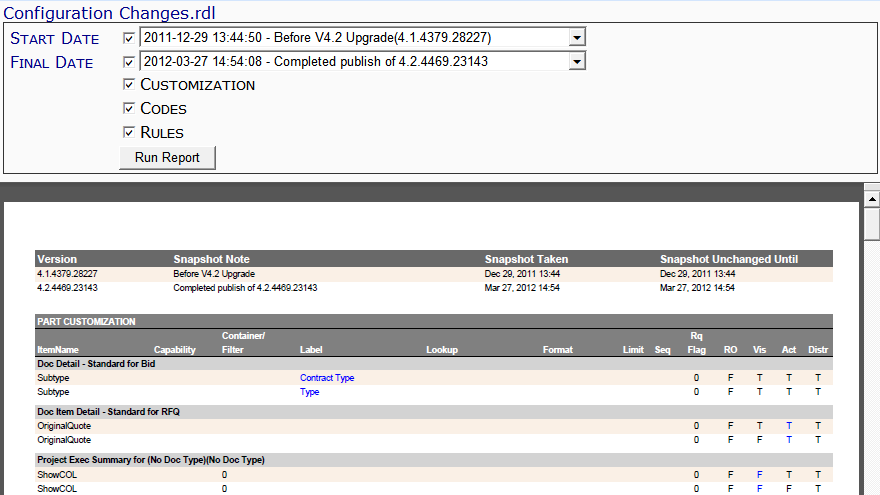
Note: although the image above does not show the Output drop-down, you can select an output method (PDF/Excel/CSV) for this report.
Filters
- Start Date – the earlier of the two configuration dates to compare. You must select a date/time from the drop-down.
- Final Date – the later of the two configuration dates to compare. You must select a date/time from the drop-down.
- Customization – whether or not the report should include customization changes.
- Code – whether or not the report should include code changes.
- Rules – whether or not the report should include rule changes.
Columns
- Version – the software build number.
- Snapshot Note – a note referencing when the snapshot was taken.
- Snapshot Taken – the date and time the snapshot was taken.
- Snapshot Unchanged Until – the date until the snapshot changed or the current date.
The rows that follow are color-coded to show the information from the start snapshot and then the final snapshot.
Note: if the Customization filter was checked, the following information appears. This information corresponds to the Customization tool on the System Admin Dashboard.
Part Customization
- ItemName – a) customization part name with Doc type and b) customization item name.
- Capability – the capability for the customized field.
- Container/Filter – internal use only.
- Label – the label for the customized field.
- Lookup – the name of the (advanced) lookup for the customized field.
- Format – the (advanced) format of the customized field.
- Limit – the number of characters allowed for the customized field.
- Seq – the (advanced) sequence of a customized tab field.
- Rq Flag – the (advanced) Rq Flag for the customized field.
- RO – whether (T) or not (F) the customized field is read-only.
- Vis – whether (T) or not (F) the customized field is visible.
- Act – whether (T) or not (F) the customized field is active.
- Distr – whether (T) or not (F) the customization is distributed by Spitfire.
Customization Item By Part
- Display Item – a) the customization part and b) the customization item.
- Type – the type of customization item: data entry (T), grid column (C), option (P) or filter (F).
- DataMember – the table (alias) name of the customization item.
- DataField – the fieldname for the customization item.
- DefaultLabel – the default label for the customization field.
- Default Visible – whether the customization field is visible (True) or not (False) by default.
Note: if the Codes filter was checked, the following information appears. This information corresponds to the Code Maintenance tool on the System Admin Dashboard.
Code Set
- SetName – the code set name.
- SetType – the code set’s type.
- CodeFlag – the code set’s flag.
- AllowEdit – whether (True) or not (False) the code set row can be edited.
- AllowAdd – whether (True) or not (False) the code set allows new codes to be added.
- AllowNextSet – whether (True) or not (False) the code set allows for a next set.
- CodeSize – the size of the code set.
Doc Type-Specific Code Sets
- Code – a) the code set and Doc type and b) the actual code.
- Description – the description of the code.
- NextSet – the name of a next code set.
- Flag – whether (True) or not (False) this code has a flag.
- Active – whether (True) or not (False) the code is active.
Code List
- Code – a) the name of the code set and b) the codes within the code set.
- Description – the description of the code.
- Active – whether (True) or not (False) the code is active.
- OnAdd – whether (True) or not (False) the code is commonly used for new data.
Note: if the Rules filter was checked, the following information appears. This information corresponds to the Rules Maintenance tool on the System Admin Dashboard.
Rule Item
- Test Value – a) the name of the rule group and b) the name of the rule.
- Filter Value – the filter value for the rule.
- Result Value – the result value for the rule.
- Is SF – whether (True) or not (False) the rule is a Spitfire default.
Last updated: October 18, 2016 at 12:19 pm;