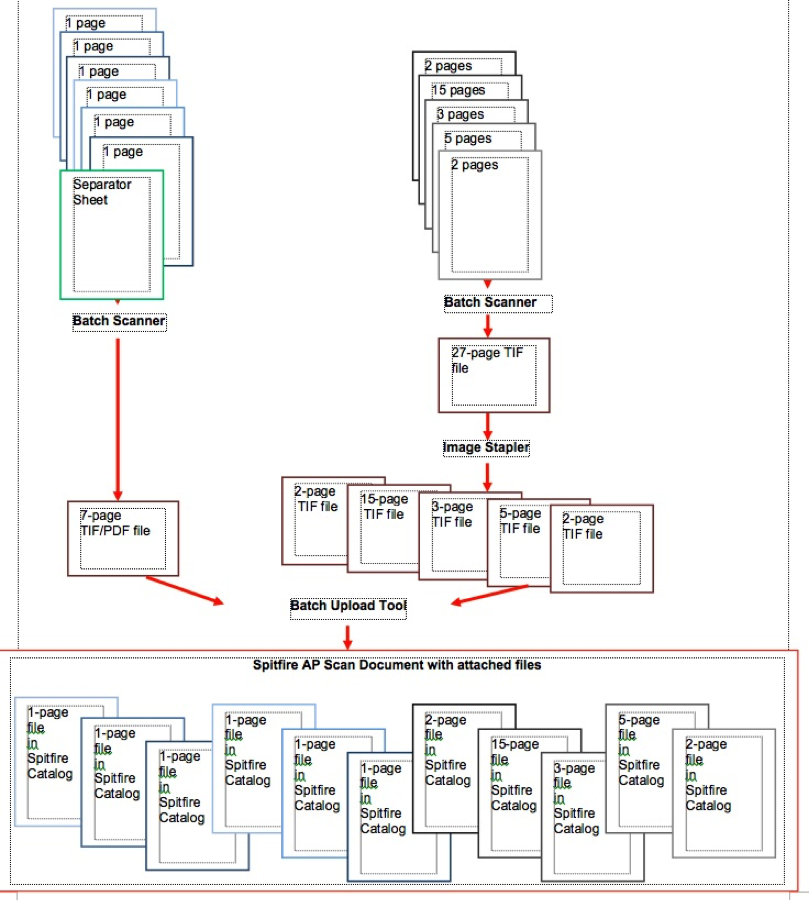
As you open your invoices and other paperwork, place them in two piles.
– one-page invoices/papers
– all other invoices/paperwork that are two pages or more
Categories:
Related Post
Spitfire Document Processing StepsSpitfire Document Processing Steps
Click Attach Image or Attach Pay Request to open the Spitfire Attach To Document dialog box. (optional) In Project, select a Project ID from the drop-down list or lookup. In
Review of BFA InformationReview of BFA Information
“Drill-down” for more information is available on certain columns of the Data worksheet. To drill down to additional information, right-click on a cell in one of the following columns: Column Opens
Finding Field and Bookmark NamesFinding Field and Bookmark Names
To find the bookmark name for the field you would like to merge, there are three options. Option One – My Settings To have Spitfire display the name of the

